End of year rollover warnings
What are end of year rollover warnings?
End of year rollover warnings are reminder messages that appear when a database is approaching the deadline for completing the end of financial year rollover.
Please see our End of year rollover article for more information on the database rollovers.
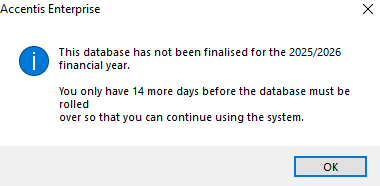
The warning is displayed when users log in and advises that the database has not yet been finalised for the current financial year. For example:
This database has not been finalised for the 2025/2026 financial year.
You only have 14 more days before the database must be rolled over so that you can continue using the system.
Why are they appearing?
End of year rollover warnings begin appearing 14 days before the end of the extended financial year (3 months after the database’s financial year end date).
The warning is displayed to advise users that the rollover must be completed before the cut-off date, and that once the extended financial year expires, users will no longer be able to post transactions in the database until the financial year rollover has been completed.
How do I stop them appearing?
End of year rollover warnings cannot be disabled or hidden.
The warnings will continue to appear until the database is rolled over into the new financial year. Once the rollover has been completed, the warnings will no longer be displayed.
Who sees them?
The warning is displayed to every user who logs in to the database during the 14-day warning period.
It is not restricted to administrators or specific security groups. Any user who accesses the database while the warning is active will be shown the message when they log in.
What’s next?
If your database is displaying end of year rollover warnings, you should begin planning your financial year rollover as soon as possible.
If you are unsure whether your database is ready to be rolled over, or you require assistance with the rollover process, please contact Accentis Support at [email protected].
Last edit: 02/10/2026