How to update the quote status for outstanding quotes in a previous Financial Year
Overview
After a Financial Year rollover, you won’t be able to Edit pending quotes directly on the Quote form.
However, if you have rolled over your database whilst outstanding quotes remain, you can still update the status of the quote as necessary.
Process
This can be done through the command UPDATE quote status for all PENDING quotes in date range (SA4470).
You can either access this command via Accounts Receivable > Command > Special commands > UPDATE quote status for all PENDING quotes in date range.
Or by command search via Ctrl + Shift + R and entering SA4470.
The command looks like this:
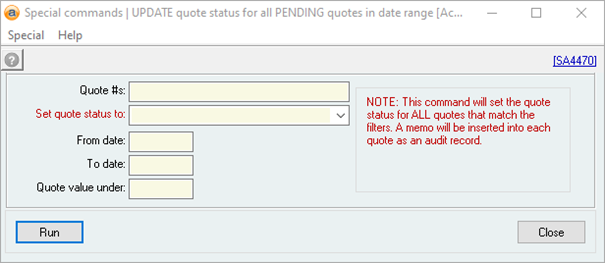
You can then add values to any or all of the filters – the only mandatory field is what you would like the quote status to be set to.
Did you find this article helpful?
If this article is missing information, ambiguous, or didn’t give you clear instructions, let us know and we will make it better! Please email us and quote the KB# in the top right of this article to let us know why it didn’t help you out and we will point you in the direction of additional information.
Last edit: 05/12/23