How to disable the Extended Item Information popup box
Overview
On Sales quotes, Sales orders, and Sales invoices, the extended item information box will pop up automatically when adding each item. This can be very helpful when you are unsure of quantities, prices, and other inventory information. However, it is possible to disable the automatic popup function either per user, for all items or on an item-by-item basis if you do not wish to see it every time.
Process
 On an item-by-item basis
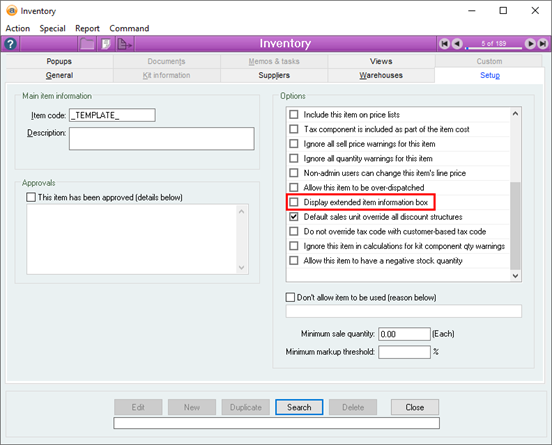
You can disable the popup box for each item via the Inventory form by opening Inventory > Inventory and opening the record for the item in question.
Within the Setup tab and within the list of Options, there is an option titled Display extended item information box.
If you uncheck this box for the item, it will disable the popup for that item only.
Per user, for all items
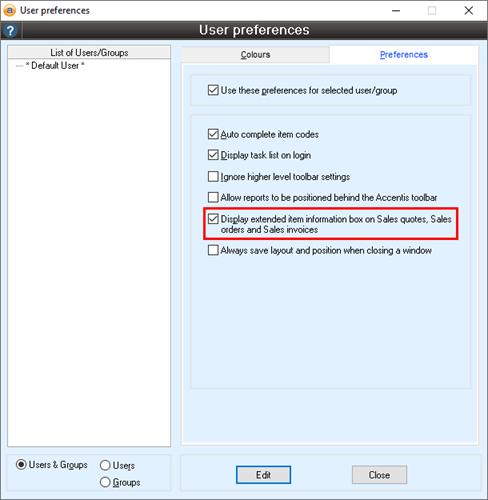
You can disable the popup box for all items via the User preferences form by opening User > User preferences and selecting the user or group for whom you would like to disable the popup.
Within the Preferences tab, there is an option titled Display extended item information box on Sales quotes, Sales orders and Sales invoices.
If you uncheck this box, it will disable the popup for all items for the user or group selected.
Additional Notes
If you uncheck either of these preferences, it does not mean that you no longer have access to the information provided in the extended item information box, only that it will not automatically pop up. You can still access this information by clicking the (i) button underneath the item code, which will bring up the Sales quote/order/invoice line information.
Did you find this article helpful?
If this article is missing information, ambiguous, or didn’t give you clear instructions, let us know and we will make it better! Please email us and quote the KB# in the top right of this article to let us know why it didn’t help you out and we will point you in the direction of additional information.
Last edit: 05/12/23