How to import discount structure changes
Overview
Within Accentis Enterprise, you can use discount structures to automatically change the prices on your sales records. These can be added and modified from the Discount structure form.
If you need to modify a large number of discount structures, you can export your discount structures, make any necessary changes, and re-import them to update your data in bulk.
Exporting and modifying your existing discount structures
- Navigate to Accounts receivable > Setup > Discount structures….
- On the Discount structure form, navigate to the Special menu and select Export complete discount structure.
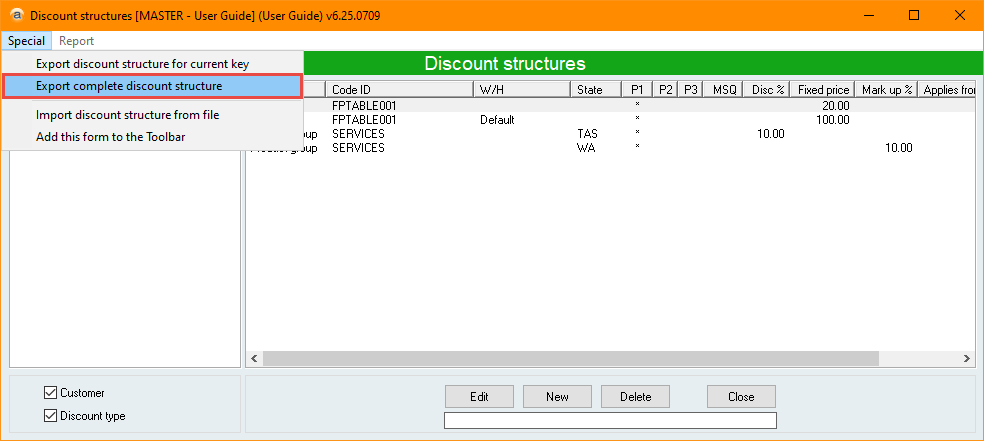
- Save the file in an easily accessible location and with an easily identifiable name.
- If you have done this process previously, you can select an existing file to overwrite its data.
- Navigate to your exported file and select Open.
- The file will be in .csv format, which can be opened in Excel.
- Make any necessary changes to the file and save it.
- You may want to make note of some of the changes so you can confirm them once you have re-imported the file.
- Please note that importing discount structures using this method will only add new or modify existing discount structures. Removing discount structures from your exported file won’t delete them from your system.
Importing your modified discount structures
We recommend you perform this process in your TEST database first to confirm there are no issues before performing in your LIVE database.
- Navigate to Accounts receivable > Setup > Discount structures….
- On the Discount structure form, navigate to the Special menu and select Import discount structure from file.
- Once you select Import discount structure from file, your pricings will be updated immediately across your system.
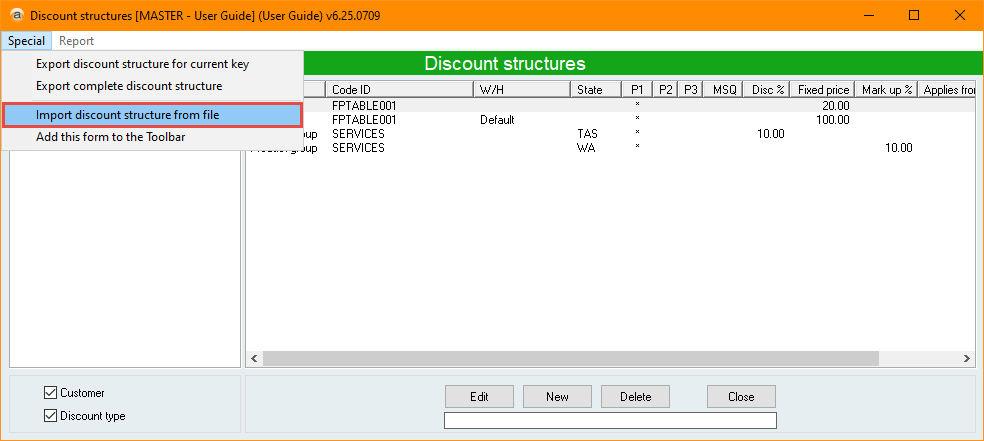
- Select your modified discount structure file and select Open.
- Review your new discount structures and confirm the new details are correct.
- If you are performing this in your TEST database, you can also create a new sales order to confirm the discount structures work in practice.
Did you find this article helpful?
If this article is missing information, ambiguous or didn’t give you clear instructions, let us know and we will make it better! Please email us and quote the KB# in the top right of this article to let us know why it didn’t help you out and we will point you in the direction of additional information.
Last edit: 02/04/2026