How do I do a foreign currency transfer between accounts?
Overview
A foreign currency transfer between two General Ledger accounts is done using a Manual Payment.
Process
- Create a Payment
- Tick Manual
- Enter the Source Account at the top.
- Enter the Destination Account at the bottom.
- If the currency of the destination account is different from the currency of the source account, it will activate the FX rate box at the top right.
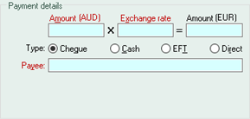
- Enter the amount and the exchange rate.
- Continue to process the payment as normal.
Did you find this article helpful?
If this article is missing information, ambiguous, or didn’t give you clear instructions, let us know and we will make it better! Please email us and quote the KB# in the top right of this article to let us know why it didn’t help you out and we will point you in the direction of additional information.
Last edit: 25/09/23