Why aren't Suppliers appearing in the Automated Remittance email list?
Overview
When you go to send your remittance advice, you may find that not all of your Suppliers appear in the Automated remittance email list, even after you have associated Payment functions for certain Supplier contacts.
Whether Suppliers appear in this list or not depends on whether the Email Remittance Advice Automatically... flag on the Payment details of the Supplier has been ticked. If this box is not ticked, that Supplier will not appear on the Automated Remittance email list.
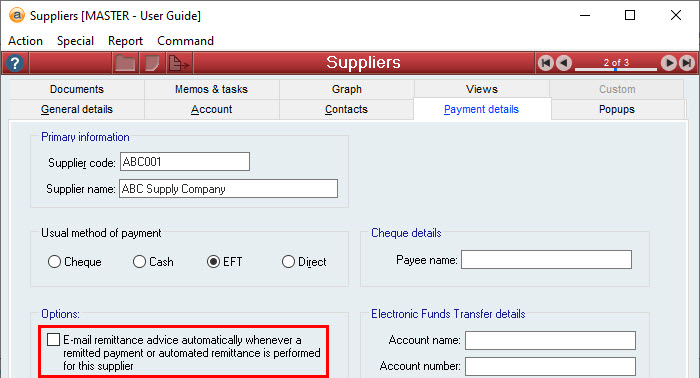
Once this box has been ticked, ensure that you have specified an E-Mail in the General details of the Supplier, or assigned the Payment Associated function to the relevant contact.
The Supplier should now appear in your Automated remittance email list.
Did you find this article helpful?
If this article is missing information, ambiguous, or didn’t give you clear instructions, let us know and we will make it better! Please email us and quote the KB# in the top right of this article to let us know why it didn’t help you out and we will point you in the direction of additional information.
Last edit: 01/02/24