How to reverse an unpaid duplicate supplier invoice
Overview
If a Supplier invoice has accidentally been entered twice, you will need to reverse the duplicate invoice’s transactions so that there are no consequences to your financials.
Depending on your organisation’s quality assurance and record-keeping processes, if the duplicate invoice has not been paid, you can do this by safely deleting it from Accentis Enterprise.
Otherwise, the duplicate invoice can be reversed by creating another, negative invoice.
Creating a negative Supplier invoice
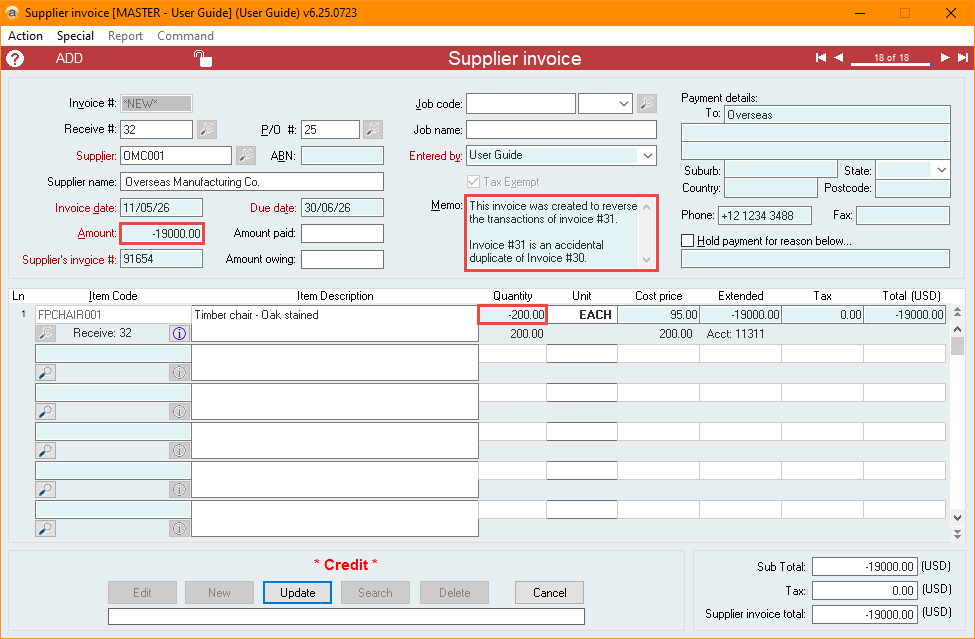
- Navigate to the duplicate supplier invoice and select Duplicate.
- Change the values in the Amount and Quantity fields to their negative equivalent.
- This should mark the invoice as a * Credit * invoice.
- Be sure to include comments and a reference to the original Invoice #, and select Update.
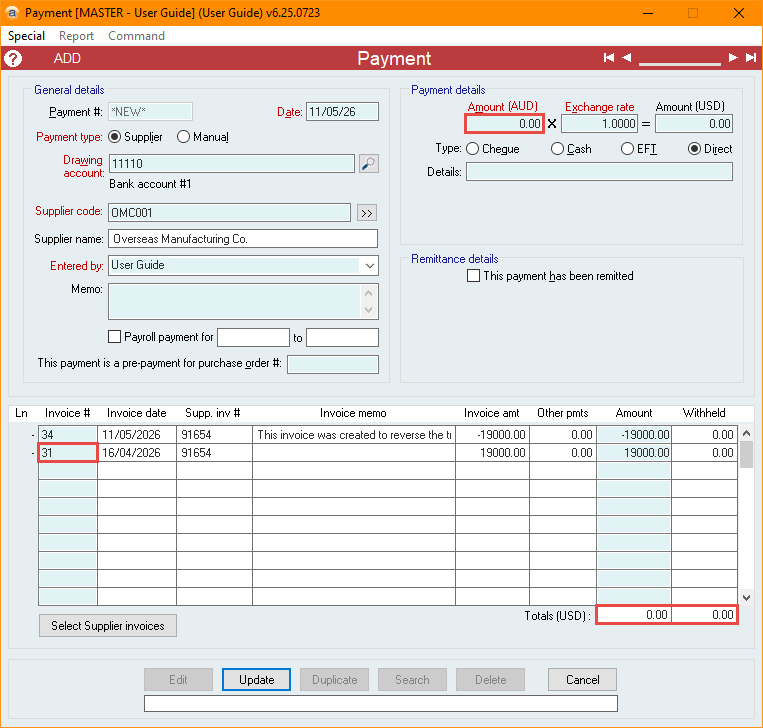
- Select Create Payment for this Supplier Invoice from the Action menu
- Set the Payment Amount to 0.00 and add a new line referencing the duplicate Invoice #.
- Make sure the payment Total displays as 0.00 and select Update.
Did you find this article helpful?
If this article is missing information, ambiguous or didn’t give you clear instructions, let us know and we will make it better! Please email us and quote the KB# in the top right of this article to let us know why it didn’t help you out and we will point you in the direction of additional information.
Last edit: 12/05/2026