Kit component change
The kit component change facility allows you to exchange all occurrences of a component in a kit with a single operation.
 Features
- Individual kits can be selected on which to perform the changes
- Multiple kits can be updated with the click of one button
- Kit change memo can be entered the same as if changes were made from the item form
- Kit version history is updated the same as if changes were made from the item form
Kit component change form
Module: Inventory
Category: Kit component change
Activation: Main > Inventory > Setup > Kit component change
Form style: Multiple instance, ActionForm
Special actions available for users with Administrator permissions:
- None
Database rules:
- None
Field definitions
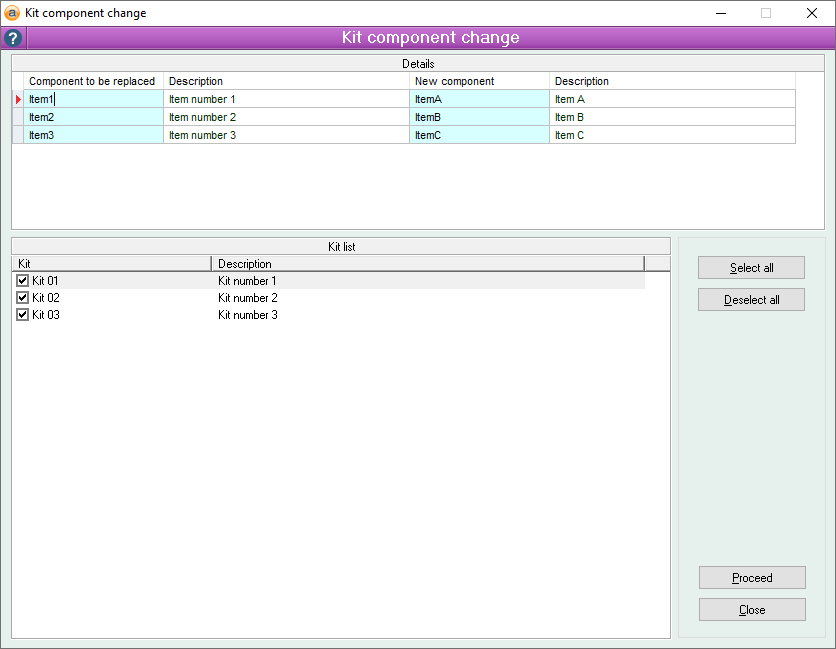
Details
The details section of the kit component change form allows entry of the existing components and their replacement components.
Initially, the 'Components to be replaced' fields will be available. When you enter a valid component in the list, its description will be filled in and the 'New component' field will become available, allowing you to enter the component with which you wish to swap the original component.
Each time you enter a new component to be replaced, the Kit list will be refreshed to display all kits which contain ANY of the components to be replaced. It should be noted that not all kits, or in fact any of the kits in the kit list will contain all the components to be replaced.
Kit list
Reference: List
The kit list section of the kit component change form allows you to select which kits you would like to update with the changes listed in the details section. Kits are added to this list automatically as the components to be replaced are entered. Any kit containing any of these components will be shown in the kit list.
As not all kits, or in fact any of the kits, in the kit list will contain all the components to be replaced, it should be noted that any components to be replaced that are not found in a selected kit will be ignored.
In the following example, three components are to be replaced. Kit1 contains Item1 and Item2, Kit2 contains Item2 and Item3 and Kit3 contains Item1 and Item3. Even though none of the kits contain all three items, the replacement will stay occur on all kits, but only the relevant items in each kit will be replaced. i.e. Item3 being replaced by item C will have no effect on Kit1 as Item3 does not exist in this kit.
Select all
Reference: Button
Information is under review for a new version and will be updated soon.
Deselect all
Reference: Button
Information is under review for a new version and will be updated soon.