How to completely depreciate an asset with a small residual WDV
Overview
Each of your Assets within the Fixed asset module will have a rate at which they depreciate. You can manage this depreciation by using the Asset transaction command to post the depreciation for the chosen period of time.
However, if you have an asset that has a small residual Written Down Value, the standard depreciation process will result in a rounded depreciation amount of $0.00 and will therefore not depreciate the asset, leaving the asset on your list of assets to be depreciated.
For example, if you have an asset with a WDV of $0.02 and a Depreciation rate of 66.67%, the rate determines that the asset should depreciate by $0.01. However, the standard depreciation type will round that number to the nearest 10 cents, which means that the depreciation for this item is calculated as being $0.00. This will then trigger an error stating that the asset is calculated to have no depreciation.
In these situations, you will need to write off the residual value to ensure it is completely depreciated. This can be done using the following steps:
Steps
- Open the Asset with the residual WDV to be written off.
- Go to the Command menu > Special commands > CHANGE Asset depreciation type.
- Change the depreciation type for this asset to FULL and hit Run.
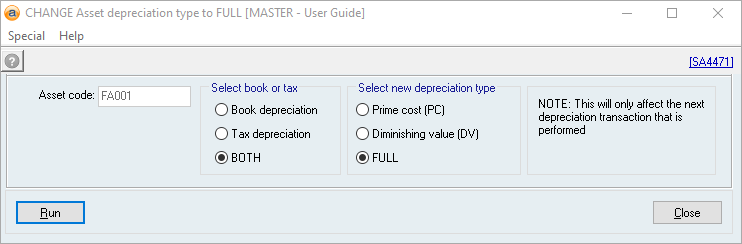
- Go back to the asset and process a Depreciation action.
The residual WDV for this asset should now be written off, and the new WDV should be $0.00.
Did you find this article helpful?
If this article is missing information, ambiguous, or didn’t give you clear instructions, let us know and we will make it better! Please email us and quote the KB# in the top right of this article to let us know why it didn’t help you out and we will point you in the direction of additional information.
Last edit: 12/11/2025