ERROR logging in: 372 Failed to load control ‘ImageList’
Quick Answer
You need to restart your Windows session by signing out and back in.
Overview
Sometimes when launching Accentis Enterprise you may receive an error message saying:
14282 : Accentis Enterprise is having trouble starting up.
372: Failed to load control ‘ImageList’ from Mscomctl.ocx. Your version of Mscomctl.ocx may be outdated. Make sure you are using the version of the control that was provided with your application.
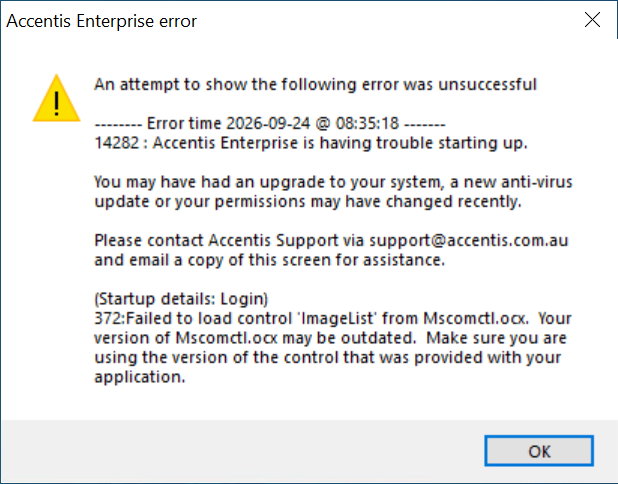
If this is the case, your Windows session needs to be terminated and reconnected.
Terminating your Windows session
To terminate your Windows session, you need to log out and back in.
- Navigate to the Start menu and click the account icon.
- On Windows 10, that will look like this:
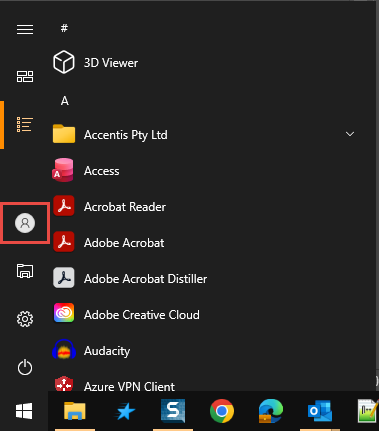
- Select Sign out (this may show as Log out depending on your Windows version).
- Log in to your computer (or reconnect to your remote desktop connection) and relaunch Accentis Enterprise.
If you are connected through a RemoteApp connection, you won’t be able to terminate your own session. If this is the case, please contact Accentis Support at [email protected] for assistance.
Did you find this article helpful?
If this article is missing information, ambiguous or didn’t give you clear instructions, let us know and we will make it better! Please email us and quote the KB# in the top right of this article to let us know why it didn’t help you out and we will point you in the direction of additional information.
Last edit: 25/09/2026