SA3996 - Sales analysis (multi-purpose, totals by category)
Overview
Report SA3996 is a sales analysis report.
It summarises sales quantities, sales value, costs, profit, mark-up and gross profit for any grouping you choose (for example by customer, item, product group, salesperson or warehouse), so you can see what is selling, to whom, and at what margin. Optional pivots show the results month by month or year on year, with variances.
The figures can be drawn from sales invoices (the default), sales orders or sales quotations.
Location
- Accounts receivable > Report > Sales analysis > Sales analysis (multi-purpose, totals by category); or
- Press CTRL+SHIFT+R and type SA3996 to run the report directly.
Sample report
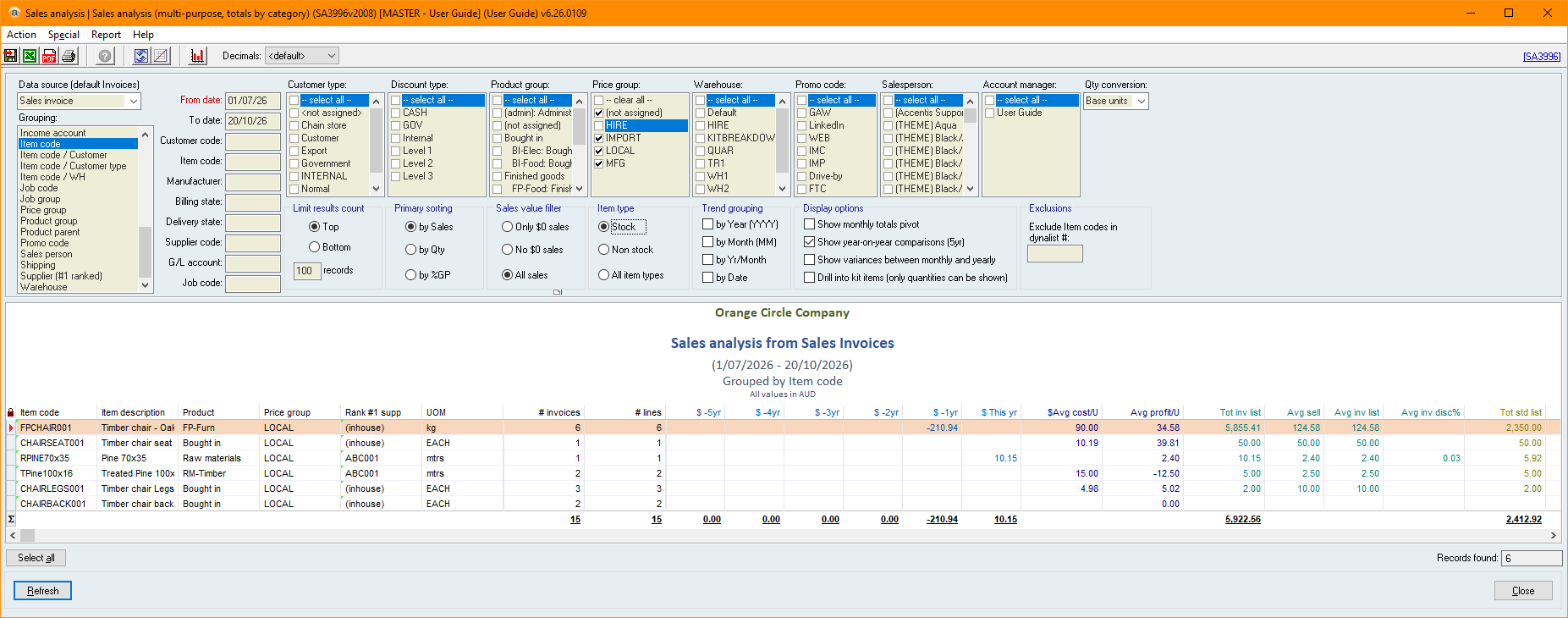
Key filters
 Data source (default Invoices)
Selects where the sales figures come from. If no selection is made, sales invoices are used.
- <ANY>
- Uses sales invoices and their lines (or the number of hire periods for hire items).
- Sales invoice
- Uses sales invoices and their lines (or the number of hire periods for hire items).
- Sales quotation
- Uses sales quotations and their lines.
- Sales order
- Uses committed sales orders at the quantity ordered (or the number of hire periods for hire items).
- Sales order (items delivered)
- Uses committed sales orders, counting only the quantity for each line that is included on dispatches.
- Sales order (items not delivered)
- Uses committed sales orders, counting only the quantity for each line that is not included on dispatches (the order quantity less the quantity on dispatches).
Grouping
Selects how results are grouped and summarised.
Based on your selection, additional columns are added to the report - and results are grouped based on these additional columns.
Each option adds the following columns. All remaining columns are the same for every option.
|
Selection |
Additional columns shown |
|
(Total) |
No additional columns are added. Results are grouped into a single row. |
|
Account manager |
Account manager |
|
Billing branch |
Branch name, Cust cd, Discount type, Account Mgr |
|
Billing branch / WH / Item |
Branch name, W/H, Item code, Item description, Product, UOM, Qty on order, Qty committed S/O, Qty committed W/O, MHQ, Qty stock and Bin loc. |
|
Billing country |
Billing country |
|
Billing name |
Billing name, Cust cd, Discount type, Account Mgr |
|
Billing name / WH / Item |
Billing name, W/H, Item code, Item description, Product, UOM, Qty on order, Qty committed S/O, Qty committed W/O, MHQ, Qty stock and Bin loc. |
|
Billing postcode |
Billing postcode, Billing suburb, Billing state |
|
Billing state |
Billing state |
|
Billing suburb |
Billing suburb, Billing state, Billing postcode |
|
Customer |
Cust cd, Customer name, Discount type, Customer type, Account Mgr |
|
Customer / Item |
Cust cd, Billing name, Item code, Item description, Product, UOM |
|
Customer / Price group |
Cust cd, Customer name, Customer type, Price group, Price group name |
|
Customer / Sales person |
Cust cd, Customer name, Discount type, Customer type, Salesperson, Account Mgr |
|
Customer / WH / Item |
Cust cd, Billing name, W/H, Item code, Item description, Product, UOM, Qty on order, Qty committed S/O, Qty committed W/O, MHQ, Qty stock and Bin loc. |
|
Customer type |
Cust type, Account Mgr |
|
Customer type / Item |
Cust type, Item code |
|
Delivery branch |
Del branch name, Delivery name, Cust cd, Discount type, Account Mgr |
|
Delivery branch / WH / Item |
Branch name, W/H, Item code, Item description, Product, UOM, Qty on order, Qty committed S/O, Qty committed W/O, MHQ, Qty stock and Bin loc. |
|
Delivery name |
Delivery name, Cust cd, Discount type, Account Mgr |
|
Delivery postcode |
Delivery postcode, Delivery suburb, Delivery state |
|
Delivery state |
Delivery state |
|
Delivery suburb |
Delivery suburb, Delivery state, Delivery postcode |
|
Discount type |
Discount type, Discount type name |
|
Email address |
Email address |
|
Income account |
A/C code, Account name |
|
Item code |
Item code, Item description, Product, Price group, Rank #1 supp, UOM |
|
Item code / Customer |
Item code, Item description, Product, UOM, Cust cd, Billing name |
|
Item code / Customer type |
Item code, Item description, Product, UOM, Cust type |
|
Item code / WH |
Item code, W/H, Item description, Product, UOM, Qty on order, Qty committed S/O, Qty committed W/O, MHQ, Qty stock and Bin loc. |
|
Job code |
Job code, Job name |
|
Job group |
Job Group |
|
Price group |
Price group, Price group name |
|
Product group |
Product, Product group name |
|
Product parent |
Product, Product group name |
|
Promo code |
Promo, Promo name |
|
Sales person |
Salesperson, Account Mgr |
|
Shipping |
Shipping |
|
Supplier (#1 ranked) |
Supplier code, Supplier name |
|
Warehouse |
Warehouse, Warehouse name |
From date
Limits results to records whose date is on or after the date you enter.
The date is the sales invoice Invoice date, sales order Date, or sales quotation Date, depending on the Data source (default Invoices).
If Show year-on-year comparisons (5yr) is ticked, the report also looks back five years from this date.
This field is mandatory.
To date
Limits results to records whose Date is on or before the date you enter.
The date is the sales invoice Invoice date, sales order Date, or sales quotation Date, depending on the Data source (default Invoices).
If left blank, there is no end date.
This filter is mandatory if Show year-on-year comparisons (5yr) is ticked.
Customer code
Limits results to records whose Customer code matches the text you enter.
Item code
Limits results to lines whose Item code matches the text you enter.
Manufacturer
Limits results to items that have a supplier record with a Manufacturer matching the text you enter.
Billing state
Limits results to records whose billing address State matches the text you enter.
Delivery state
Limits results to records whose delivery address State matches the text you enter.
Supplier code
Limits results to items that have a supplier whose Supplier code matches the text you enter.
This matches any supplier recorded against the item, not only the highest ranked supplier.
G/L account
Limits results to lines whose Income account matches the text you enter.
Job code
Limits results to lines whose Job code matches the text you enter.
This only checks the Job code linked to the lines of relevant records. It does not check the Job code assigned to the entire record.
Customer type
Limits results to customers whose Customer type matches one of the types you select.
Discount type
Limits results to records whose Discount type matches one of the types you select.
Product group
Limits results to items in one of the Product groups you select.
Selecting a parent product group also includes its child product groups.
Price group
Limits results to items in one of the Price groups you select.
Warehouse
Limits results to lines whose warehouse matches one of the warehouses you select.
This only checks the warehouse linked to the lines of relevant records. It does not check the warehouse assigned to the entire record (this may differ, for instance, if the warehouse of a sales invoice has been changed from the warehouse of its original sales order).
Promo code
Limits results to records whose Promo matches one of the promotions you select.
Salesperson
Limits results to records whose Our contact matches one of the users you select.
Account manager
Limits results to customers whose Account manager matches one of the users you select.
Qty conversion
Controls which item units and quantities are used for each item (either the item's Base unit, Unit 2, or Unit 3).
If Unit 2 is selected and an item does not have a Unit 2 configured, the item's Base unit will be used.
If Unit 3 is selected and an item does not have a Unit 3 configured, the item's Unit 2 will be used if possible. Otherwise the item's Base unit will be used.
Limit results count
Limits how many results are returned and their order.
- Top
- Shows the highest results first, according to the Primary sorting selected.
- Bottom
- Shows the lowest results first, according to the Primary sorting selected.
- records
- The number of results to show. If left blank, all results are shown.
Primary sorting
Selects the measure that the results are sorted by.
- by Sales
- Sorts by the Sales ex column.
- by Qty
- Sorts by the Qty sold column.
- Causes the monthly and yearly pivot columns to show quantities instead of sales values.
- by GP%
- Sorts by the GP% column.
If Drill into kit items (only quantities can be shown) is ticked, results will always be sorted as if by Qty is selected. Warning messages will appear if another sorting method is chosen.
Sales value filter
Limits results by the selling price of each line:
- Only $0 sales
- Includes only lines whose Sell price is 0.
- No $0 sales
- Excludes lines whose Sell price is 0.
- All sales
- Includes all lines.
Item type
Limits results to items whose Item type matches the type you select:
- Stock
- Includes only Stock items.
- Non stock
- Includes only Non stock items.
- All item types
- Includes all items.
Trend grouping
Splits each group by a period of time so you can see trends. Selecting more than one option splits the results by each of them.
- by Year (YYYY)
- Adds a Year column (e.g. 2026). Results are separated based on the year they occurred.
- by Month (MM)
- Adds a Month # column (e.g. 07). Results are separated based on the month they occurred (combining the same month across all years, if no year trend grouping is specified).
- by Yr/Month
- Adds a Yr/Month column (e.g. 26/07). Results are separated based on the month and year they occurred.
- by Date
- Adds a Date column showing each day (e.g. 2026-07-31). Results are separated based on the specific date they occurred.
Show monthly totals pivot
Adds a column for each month between the From date and To date, showing the sales value (or quantity, if sorting by Qty) for that month.
If no To date is set, the current date will be used.
Show year-on-year comparisons (5yr)
Adds columns comparing sales values (or quantity, if sorting by Qty) for the From date to To date period with the same period in each of the previous five years.
Hides Qty sold, Sales ex, Costs, Profit, Mkp%, and GP% columns, as these are already included in the This yr column.
Requires both a From date and To date.
Show variances between monthly and yearly
Adds a variance and a variance % column to the monthly pivot and/or year-on-year columns, comparing each period to the one before it.
Only applies when Show monthly totals pivot or Show year-on-year comparisons (5yr) is ticked.
Drill into kit items (only quantities can be shown)
Includes components of kit items, so the quantities of components sold can be seen.
Only quantities can be shown while this is ticked: sales, cost, profit and price columns are hidden, and the monthly and year-on-year pivots show quantities regardless of the Primary sorting selection.
Exclude Item codes in dynalist #
Excludes items in the dynalist number you enter.
When Drill into kit items (only quantities can be shown) is ticked, the exclusion is applied to the kit items and their component items separately.
Report columns
Yr/Month
The year and month that the sales data applies to (in YY/MM format).
Only visible when by Yr/Month is selected from the Trend grouping filter.
Date
The date the sales data applies to (in YYYY-MM-DD format).
Only visible when by Date is selected from the Trend grouping filter.
Year
The year that the sales data applies to (in YYYY format).
Only visible when by Year (YYYY) is selected from the Trend grouping filter.
Month #
The month number that the sales data applies to (in MM format).
Only visible when by Month (MM) is selected from the Trend grouping filter.
Grouping columns
The first columns identify the group (e.g. Customer code, Item code, Product group). Which columns appear depends on the Grouping selection.
Where a group contains more than one value for a column (for example a customer group containing several customer types), the cell is left blank.
Drill
Shows D when the row includes data from component items from a kit that was drilled into.
Only visible when Drill into kit items (only quantities can be shown) is ticked.
# invoices / # quotes / # orders
The number of sales invoices, sales orders, or sales quotations that the sales data for this group is included on.
The heading of this column changes depending on your Data source (default Invoices) selection.
# lines
The number of sales invoice, sales order, or sales quotation lines that the sales data for this group is included on, based on your Data source (default Invoices) selection.
Qty sold
The total quantity sold for items included in this group, shown in units based on your Qty conversion selection (hire lines use the number of hire periods instead of the quantity, where applicable).
When Drill into kit items (only quantities can be shown) is ticked, components of kit items are also included (with their quantities based on the kit item's current bill of materials).
For sales invoices, this value hyperlinks to a search showing the underlying invoices (report SA1284).
Hidden when Show year-on-year comparisons (5yr) is ticked.
Sales ex
The total sales value excluding tax for items included in this group.
For sales records not in the local currency, values are converted to local currency based on the exchange rate stored against the sales record.
The column heading changes to include the symbol of the local currency.
Hidden when Drill into kit items (only quantities can be shown) or Show year-on-year comparisons (5yr) is ticked.
Costs
The total cost of the items sold in this group (hire items have a cost of 0).
For sales invoices, this is the cost recorded internally against the invoice line multiplied by its quantity.
For sales orders and quotations, it is the item's Last cost multiplied by the quantity.
Hidden when Drill into kit items (only quantities can be shown) or Show year-on-year comparisons (5yr) is ticked.
Profit
Sales ex less Costs.
Hidden when Drill into kit items (only quantities can be shown) or Show year-on-year comparisons (5yr) is ticked.
Mkp%
The mark-up percentage: Profit / Costs x 100. Shows 0 when costs are 0.
Hidden when Drill into kit items (only quantities can be shown) or Show year-on-year comparisons (5yr) is ticked.
GP%
The gross profit percentage: Profit / Sales ex x 100. Is treated as 0 when sales are 0.
Hidden when Drill into kit items (only quantities can be shown) or Show year-on-year comparisons (5yr) is ticked.
Monthly total columns (e.g. Oct-26)
One column per month between the From date and To date, showing the sales value or the quantity for that month.
When Show variances between monthly and yearly is ticked, each month after the first is followed by a Var column (the change from the previous month) and a % column (the change as a percentage of the previous month).
Only shown when Show monthly totals pivot is ticked.
If Drill into kit items (only quantities can be shown) is ticked, or by Qty is selected, these columns will show quantities instead of sales values.
This yr, -1yr, -2yr, -3yr, -4yr, -5yr
The sales value or quantity for the From date to To date period, and for the same period in each of the previous five years.
When Show variances between monthly and yearly is ticked, each year is followed by a Var column (the change from the year before) and a % column.
Only shown when Show year-on-year comparisons (5yr) is ticked.
If Drill into kit items (only quantities can be shown) is ticked, or by Qty is selected, these columns will show quantities instead of sales values.
Avg cost/U
The average cost per unit: Costs / Qty sold.
Hidden when Drill into kit items (only quantities can be shown) is ticked.
Avg profit/U
The average profit per unit: (Sales ex / Qty sold) less (Costs / Qty sold).
Hidden when Drill into kit items (only quantities can be shown) is ticked.
Tot inv list
The total list price of items included in this group, based on the sales record lines (the sum of the List price of each line multiplied by its quantity).
For sales records not in the local currency, values are converted to local currency based on the exchange rate stored against the sales record.
Hidden when Drill into kit items (only quantities can be shown) is ticked.
Avg sell
The average selling price per unit: Sales ex / Qty sold.
Hidden when Drill into kit items (only quantities can be shown) is ticked.
Avg inv list
The average list price per unit, based on the sales record lines: Tot inv list / Qty sold.
Hidden when Drill into kit items (only quantities can be shown) is ticked.
Avg inv disc%
The average discount against the list price, based on the sales record lines: (Tot inv list less Sales ex) / Tot inv list x 100.
Hidden when Drill into kit items (only quantities can be shown) is ticked.
Tot std list
The total list price of items included in this group, based on the item (the number of base units sold multiplied by the item's List price per unit).
Hidden when Drill into kit items (only quantities can be shown) is ticked.
Avg std list
The average list price per unit, based on the item: Tot std list / Qty sold.
Hidden when Drill into kit items (only quantities can be shown) is ticked.
Avg std disc%
The average discount against the list price, based on the item: (Tot std list less Sales ex) / Tot std list x 100.
Hidden when Drill into kit items (only quantities can be shown) is ticked.
Qty on order
The quantity of this item expected to be incoming to this warehouse: Qty on order + Qty on W/O for this item/warehouse combination.
Only shown for groupings that include the item and warehouse.
Qty committed S/O
The quantity of this item in this warehouse committed to sales orders: Qty Committed for this item/warehouse combination.
Only shown for groupings that include the item and warehouse.
Qty committed W/O
The quantity of this item in this warehouse committed to work orders: Qty Committed W/O for this item/warehouse combination.
Only shown for groupings that include the item and warehouse.
MHQ
The minimum hold quantity of this item in this warehouse: Minimum hold qty for this item/warehouse combination.
Only shown for groupings that include the item and warehouse.
Qty stock
The quantity of this item in stock in this warehouse: Qty stock for this item/warehouse combination.
Only shown for groupings that include the item and warehouse.
Bin loc
The bin location number of this item in this warehouse: Bin # for this item/warehouse combination.
Only shown for groupings that include the item and warehouse.
First sale
The earliest record Date in this group.
Last sale
The latest record Date in this group.
#Sales/mth
The average number of sales records per month: the number of invoices/orders/quotes in this group / the number of months from First sale to Last sale (inclusive).
Hidden when Drill into kit items (only quantities can be shown) is ticked.
Last edit: 29/10/2026