Why can't I journal directly to the Trade Debtors group account?
Overview
Within Accentis Enterprise, there are two Account types: Group accounts and Normal accounts.
A group account is an account that can be assigned as the Parent account of a normal account and will show the total balance of its sub-accounts (i.e. the group account’s balance will be the sum of the totals of its child accounts).
This means that account transactions can only be performed on normal accounts, and not directly on group accounts.
For example, if you are required to post an adjustment journal to Credit the Trade Debtors group account you would not be able to perform this transaction directly on the Trade Debtors group.
The way you work around this is to create a Trade Debtors adjustment account which does not reflect an actual trade debtor, but still has the Trade Debtors group account as its parent.
Creating a Trade Debtors adjustment account
- Navigate to General ledger > Accounts and select New.
- Enter the details of the account as below:
- Set the Account code field to ACC-ADJ (where ACC is the Account code of the Trade Debtors group account).
- Set the Name field to Trade Debtors – Adjustments.
- Set the Ledger category field to Asset.
- Set the Type field to Group.
- Set the Parent account field to the Account code of the Trade Debtors group account.
- Select Update to save.
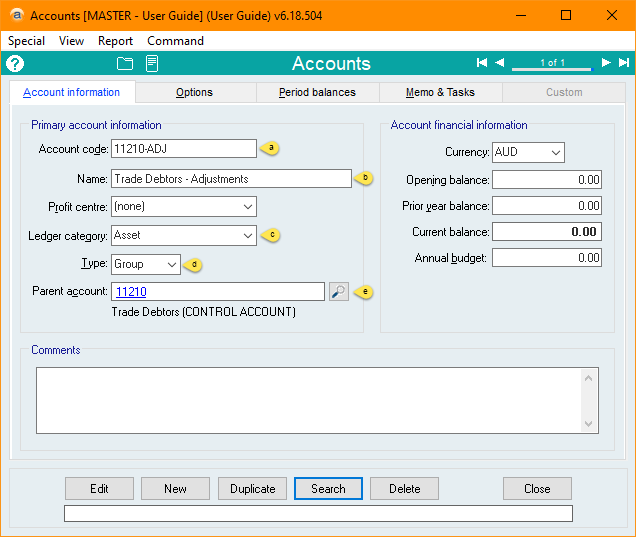
Now, when you need to post an adjustment journal to Trade Debtors group account, you can post it directly to the Trade Debtors – Adjustments account, and the group account will have its balance updated.
Did you find this article helpful?
If this article is missing information, ambiguous, or didn’t give you clear instructions, let us know and we will make it better! Please email us and quote the KB# in the top right of this article to let us know why it didn’t help you out and we will point you in the direction of additional information.
Last edit 07/10/25