Why are my Receives showing as un-invoiced even though they have an invoice?
Overview
Un-invoiced receives represents all goods or services that you have received from Suppliers through a Purchase order for which you have not yet received an invoice. You can easily view all of your un-invoiced receives using the uninvoiced receivings analysis report (Accounts payable > Report > Receive > Uninvoiced receivings analysis (SA2432)).
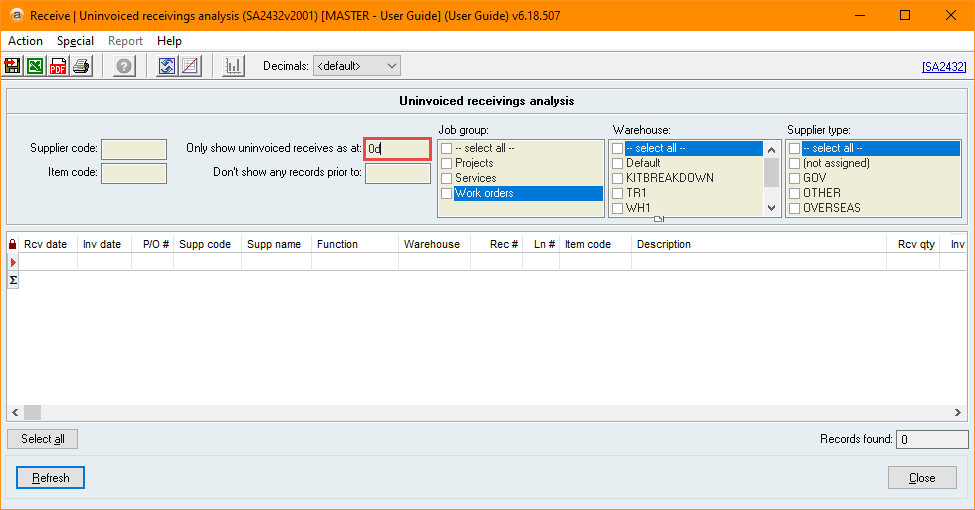
When using this report, however, you may notice receives appearing even though they already have an invoice. This is due to the Only show uninvoiced receives as at filter.
This article talks specifically about the Only show uninvoiced receives as at filter. For additional information regarding un-invoiced receives, please see Keeping track of Un-invoiced Receives.
How does the Only show uninvoiced receives as at filter work?
The Only show uninvoiced receives as at filter is a mandatory field. The uninvoiced receivings analysis report will show any receives (that also match the other filters) where both of the following are true:
- The Receive Date is before the Only show uninvoiced receives as at date.
- The Invoice date is after the Only show uninvoiced receives as at date.
- Including where there is no Invoice date (i.e. when no invoice is received).
The benefit of this is that it allows you to view which receives were un-invoiced at that specific date, but it also means that a receive that is now invoiced may show as un-invoiced if it wasn’t invoiced at that date.
How do I view only the receives that are currently un-invoiced?
The way to view the current un-invoiced receives is to set the Only show uninvoiced receives as at field to today’s date (remember, you can use 0d as a shortcut!). This way, you are only viewing receives that have an Invoice date after today.
Did you find this article helpful?
If this article is missing information, ambiguous or didn’t give you clear instructions, let us know and we will make it better! Please email us and quote the KB# in the top right of this article to let us know why it didn’t help you out and we will point you in the direction of additional information.
Last edit: 12/11/2025