How to clear residual values from Serial or Batch tracked goods
Overview
Sometimes you may have a value of inventory without having a quantity of inventory for certain items. This is called a “residual value” and can happen when you have received goods into stock, consumed those goods, and then retrospectively modified the initial cost at which they were received. It is common when you adjust a Purchase order or invoice values after consumption of goods. This is particularly common with serial-tracked or batch-tracked goods because you typically never receive any more of the same batch to absorb any residual. The processes below show how to remove any residual (non-zero) cost from inventory items that have no quantity left in stock.
 Process
Verify that you have residual values
Before you can clear any residual values from your inventory, you need to know which stock items have them. To do this, run SA1203: Data alerts | Items with residual total cost and zero stock. Any residual stock is qualified as items that have a zero quantity, but a total cost value. These items will need to be cleared to balance your stock inventory.
For items with a Standard cost
For items that have a standard cost entered (Std Cost ($) field has a value in it), then you will need to turn off the standard cost for the item so that you can manually adjust the residual value using the steps in the section below.
To change an item’s standard costing,
- Ensure that there are no items in stock
- Edit the item and remove the standard cost amount (NOTE: This is not the same as typing 0: it must be blanked out)
Once this has been done, you can follow the steps below to remove residual values from non-standard cost items
Finally, edit the item and put back the standard cost.
For items without a Standard cost
There are two main methods you can use to remove residual costs. The first, using stocktakes, takes longer but is able to be performed on many items at once. The second, using stock revaluations, is faster for an individual item but can only be performed on one item at a time (if there are multiple serial or batch numbers with different residual costs, then they will need to be performed separately as well).
Both methods will have the same end result, but one will be faster than the other depending on how many total items you are adjusting.
When there are many items (using stocktakes)
The process utilises a pair of stocktakes:
- One stocktake adds a quantity of 1 to any item that does not have anything in stock, and thereby absorbs the residual into that item
- The second stocktake removes the item again, along with its absorbed residual value, and writes it off
Create a stocktake to assign a value to any item with a zero quantity in stock but which has a value
You need to create a stocktake to assign the residual stock to a quantity, that will then be used to clear out the values.
- Create a stocktake > Set the Date and Date applied fields to the date you want to post the residual values to your Profit & Loss > Record the Stocktake #
- Select a Stock variance account that represents the location of the residual write-off
- Click Add items > Select all inventory that has a value but no quantity in stock. You can also use this method for to capture and write off residual values for non-tracked goods
- When selecting items, ensure that you select them from all warehouses. Use the following filters:
- Warehouse – ALL
- Type of item – Either
- Quantity check – Equal to 0
- Value check – Not zero

- Once all items have been located, Select ALL and then Select. This will show all items on the stocktake that have a residual cost but no inventory
- Assign each line a Quantity counted to a value of 1. We need to add a value of each item to stock to absorb the residual value
- Update and apply the stocktake

Create a stocktake to REMOVE the items just added, along with their residual values
Now that the residual stock items have a quantity of them in stock, we need to create another stocktake to remove them. When we do this, the absorbed values will also be removed, clearing them from your stock.
- Create a new stocktake and fill in all the details
- Press Update
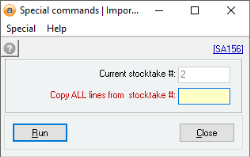
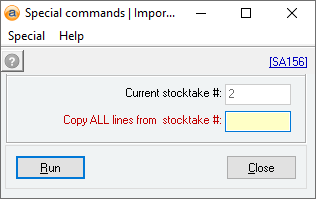
- Select Command > Special Command > Import all lines from another stocktake (SA156)
- In the Copy ALL lines from stocktake # field, enter the stocktake # you recorded in the previous step
- Press Run to bring in all the items from the first stocktake
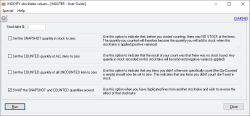
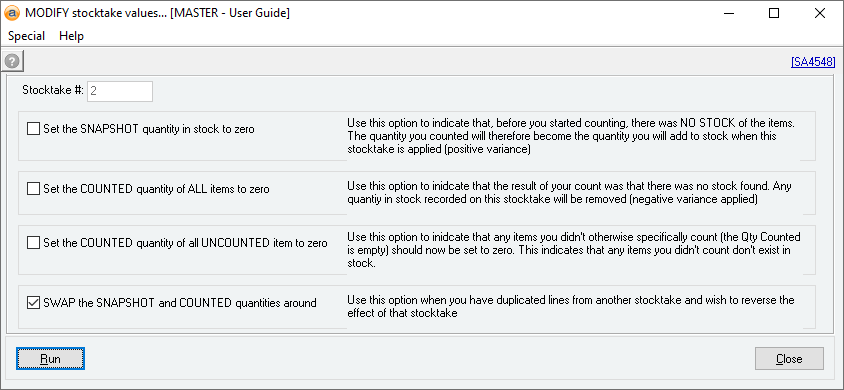
- Now we need to swap some values around to take all of these out of stock again. Select Command > MODIFY Stocktake values
- Select SWAP the SNAPSHOT and COUNTED quantities around
- Press Run to swap the values
- Press Update costs button (very important!)

- Update and apply the stocktake
 When there are only a few items (using stock revaluations)
- Make note of the affected serial/batch numbers, warehouses, and residual values.
- From the item's Inventory record, navigate to Action and select Stock revaluation...
- Set the Warehouse field to the warehouse containing the residual value.
- From the Which action would you like to perform? section, select Add the amount below to the total stock value of each selected serial number.
- Enter the negative amount of the residual value into the Amount field (if the residual value is negative, this number will be positive).
- Select the affected Serial numbers (you can perform a Stock revaluation on multiple serial numbers at the same time, but this is only recommended if the serial numbers have the same residual value).
- Select Update to perform the revaluation.
- Repeat this process for each affected Item code and serial number.
Verify that residual stock items have been removed
To check that you have correctly removed all residual values, we need to run the same report we did at the start to initially find them. Run SA1203 which will show you any residual stock items that you have missed.
Did you find this article helpful?
If this article is missing information, ambiguous, or didn’t give you clear instructions, let us know and we will make it better! Please email us and quote the KB# in the top right of this article to let us know why it didn’t help you out and we will point you in the direction of additional information.
Last edit: 16/01/2026