Why does my work order complain that it has not consumed all stock when I try to finish?
Overview
Within Accentis Enterprise, instead of consuming (removing from stock) kit components automatically when a Start action is performed, you can manually specify how many of each component to consume using the Qty Kitted column on the Work Order’s Kit list tab.
If you have a value in the Qty Kitted column when you attempt to perform a Finish action on a Work order, you may receive an error message saying: “To finish this number of kits, a total of X of item Y must have been consumed (Qty used column).”
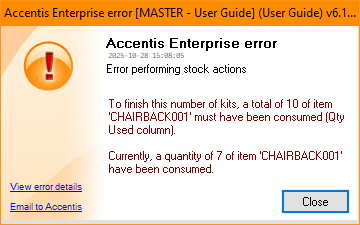
This occurs because the Qty Kitted value for one or more components is not sufficient to build the number of kits you are attempting to finish. In other words, the quantity of a component required for the Finish action is greater than the amount you have told Accentis Enterprise to remove from stock.
How does the Qty Kitted work?
When a Work order is created, the component items are not considered to be consumed immediately (i.e. the item’s Qty in Stock does not go down straight away), but they are instead considered to be committed (i.e. the item’s Qty Committed goes up). Usually, the components for the kit are not consumed to the Work order until a Start action is performed, and the amount that the Work order will attempt to consume is shown in the Qty Started column (the amount that is actually consumed is shown in the Qty Used column).
Instead of attempting to consume the amount shown in the Qty Started column, you can manually tell the Work order how many of a component to attempt to consume by entering that amount in the component’s Qty Kitted column.
If there is an amount entered into the Qty Kitted column, no matter the Qty Started, the Qty Used will not go above the Qty Kitted.
How do I perform the Finish action?
To allow Accentis Enterprise to perform a Finish action for this Work order, you can either:
- Edit the Work Order and clear the amount in the Qty Kitted column. This will cause the Qty Used to recalculate based on the Qty Started, allowing the amount consumed for the Work order to increase.
- Edit the Work order and increase the Qty Kitted to the amount that is required to be consumed for the Finish action.
Did you find this article helpful?
If this article is missing information, ambiguous or didn’t give you clear instructions, let us know and we will make it better! Please email us and quote the KB# in the top right of this article to let us know why it didn’t help you out and we will point you in the direction of additional information.
Last edit: 04/11/25