Kit breakdown
A Kit breakdown is a facility to break down or disassemble a kit into its constituent components. This may happen if an item was ordered as a kit and subsequently broken down into separate component parts, or if the parts in an assembled kit need to be used for other purposes.
 Features
- Any version of any kit can be selected for breakdown
- More than one item of the same kit can be broken down at once
- Pop up notifications available for Items
Kit breakdown form
Module: Manufacturing
Category: Kit breakdown
Activation: Main > Manufacturing > Kit breakdown
Form style: Multiple instance, WYSIWYS, SODA
Special actions available for users with Administrator permissions:
- Alter the User ID in the Entered by field.
- Change the User ID of the Entered by field of memos.
- Edit memos entered by other users.
Database rules:
- A Kit breakdown cannot be given a date that is outside the range of the Extended financial year
- A Kit breakdown cannot be deleted if its date is outside the range of the Extended financial year or before the Journal lock date
- You cannot break down more Items of the kit than currently exist in the Kit stocking warehouse
Field definitions
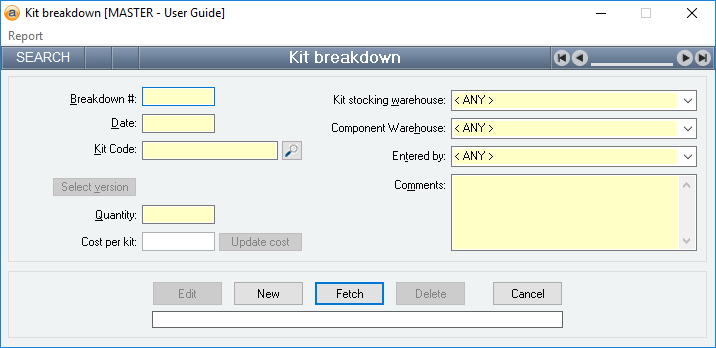
Breakdown #
Reference: number, read-only, WYSIWYS
This number uniquely identifies a Kit breakdown. The Breakdown # is automatically generated by the system after the first update and cannot be changed for the life of the kit breakdown.
If a kit breakdown is deleted, its Breakdown # will never be used again for another kit breakdown.
Kit code
Reference: text(30), mandatory, AutoComplete, QuickList, WYSIWYS
This is the item code of the kit that is being broken down. This must represent a valid item code, but you can type the first few letters of the code and activate the QuickList (by clicking on the button or pressing the QuickList Hot Key.
Select version
Reference: button
It is possible to break down any version of a kit. When you enter an item code into the Kit code field manually, the latest version of that kit will be broken down. However, if you require a previous version, click on the Select version button which will display the Kit versions form from which you can select any previous version of a kit.
Cost per kit
Reference: currency, read-only
This is the cost of the kit being broken down. If you are in Add or Edit mode, this is the current average cost of the kit in the specified warehouse. If you are in Idle mode, this is the cost that was used when the kit breakdown was updated.
The cost that will be assigned to the individual components will be calculated as a portion of this price based on the ratio of the component’s current average cost and the current build-up cost of the kit.
Update cost
Reference: button
This button causes the value in the Cost per kit field to be recalculated to the kit's Universal cost.
Kit stocking warehouse
Reference: select from list, mandatory, HotEdit, WYSIWYS
This is the warehouse from which the kit will be removed to be broken down. There must be sufficient stock of the kit (and its quantity) you are breaking down in this warehouse for the Kit breakdown to update successfully.
Component warehouse
Reference: select from list, mandatory, HotEdit, WYSIWYS
This is the warehouse into which all the components of the broken down kit will be placed. This does not have to be the same warehouse from which the kit is being taken.
Entered by
Reference: select from list, mandatory, HotEdit, WYSIWYS
This is the User name (not user login ID) of the user that entered the Kit breakdown. This field is automatically filled in with the user name of the current user and can only be changed if the current user has administrator permissions.
Comments
Reference: memo, expandable, WYSIWYS
These are any comments relating to the kit breakdown.