ERROR logging in: The current barcoding port number is not valid
KB471
Overview
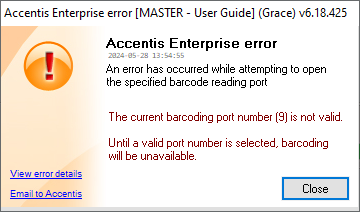
Occasionally when trying to log in, you may receive the following error:
Meaning
This error occurs when a user attempts to open a Sales invoice form or log in when a specified barcode scanner is not plugged in.
It occurs because their session has been configured to use a barcode scanner, but that scanner is not connected properly or not registered against the listed port.
This can happen if barcoding has been accidentally enabled for the computer, or if a connected barcode scanner has been removed or re-connected incorrectly.
Solution
There are two ways to fix this error, depending on your situation.
 If the PC does not have a barcode scanner
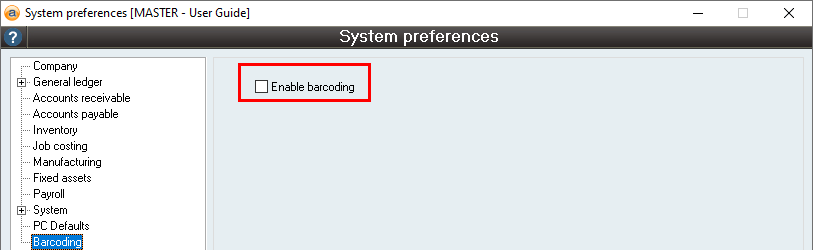
If the PC does not have a barcode scanner, then you can simply turn off barcoding within Accentis Enterprise, which will stop the error from occurring.
- Go to System > Preferences > Barcoding tab, click Edit, and untick Enable barcoding
- This will need to be completed while logged into the PC producing the error.
- Click Update. The error should no longer appear on login.
If the PC has a barcode scanner
If the PC is supposed to have a barcode scanner, then you will need to check the following:
- Is the scanner plugged in?
- If it is not, plug it in and try logging in again.
- If it is plugged in, check that it the connection is secure (e.g., plugged in fully, not loose, no debris caught in port or connector).
- If it is plugged in securely, you will need to follow the steps listed in Configuring your Barcode Scanner, particularly Step 4: Configure Accentis Enterprise for your Barcode Scanner, to try and resolve the issue.
If none of the configuration steps resolve the error, then you will need to contact Accentis Support and detail the actions taken. In the meantime, until the root of the issue can be identified and resolved, you can stop the error from occurring by disabling barcoding for that PC. To do this, follow the steps detailed under If the PC does not have a barcode scanner.
Did you find this article helpful?
If this article is missing information, ambiguous, or didn’t give you clear instructions, let us know and we will make it better! Please email us and quote the KB# in the top right of this article to let us know why it didn’t help you out and we will point you in the direction of additional information.
Last edit 29/05/24