ERROR updating a record: The transaction date is before the System lock date
Quick Answer
A System lock date has been set for your database which can only be changed by Accentis Support.
Overview
When attempting to update a past record, or create one that would modify past transactions, you may receive an error message saying:
Error updating current record
The transaction date (DD/MM/YY) is before the System lock date
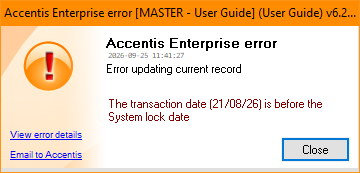
This is because a System lock date has been set to protect the integrity of the database, and the transaction is dated before that date. To perform the desired update, you will need to contact Accentis Support at [email protected] to have this date changed.
What is the System lock date?
The System lock date is a special lock date that can only be set or changed by Accentis Support. It is typically used in situations where an organisation has gone live with Accentis Enterprise part way through a financial year and opening balances have been recalculated as at the go-live date.
The purpose of the System lock date is to prevent changes to historical transactions that could alter those opening balances and result in incorrect account balances or financial reports. Unlike other lock dates, the System lock date cannot be modified by users through the application.
The System lock date is separate from the Journal lock date and Account lock date. Even if a user has permission to change those lock dates, the System lock date remains in effect until it is changed by Accentis Support.
Did you find this article helpful?
If this article is missing information, ambiguous or didn’t give you clear instructions, let us know and we will make it better! Please email us and quote the KB# in the top right of this article to let us know why it didn’t help you out and we will point you in the direction of additional information.
Last edit: 25/09/2026