SA1237 - QUICKLIST Work order list
Overview
Report SA1237 is a master work order listing.
It shows work orders with their status, quantities, BOM shortages and optional labour estimates, so you can see what is ready to build, what is in progress and what is short of components.
Location
- Manufacturing > Report > QUICKLIST Work order list; or
- Press CTRL+SHIFT+R and type SA1237 to run the report directly.
Sample report
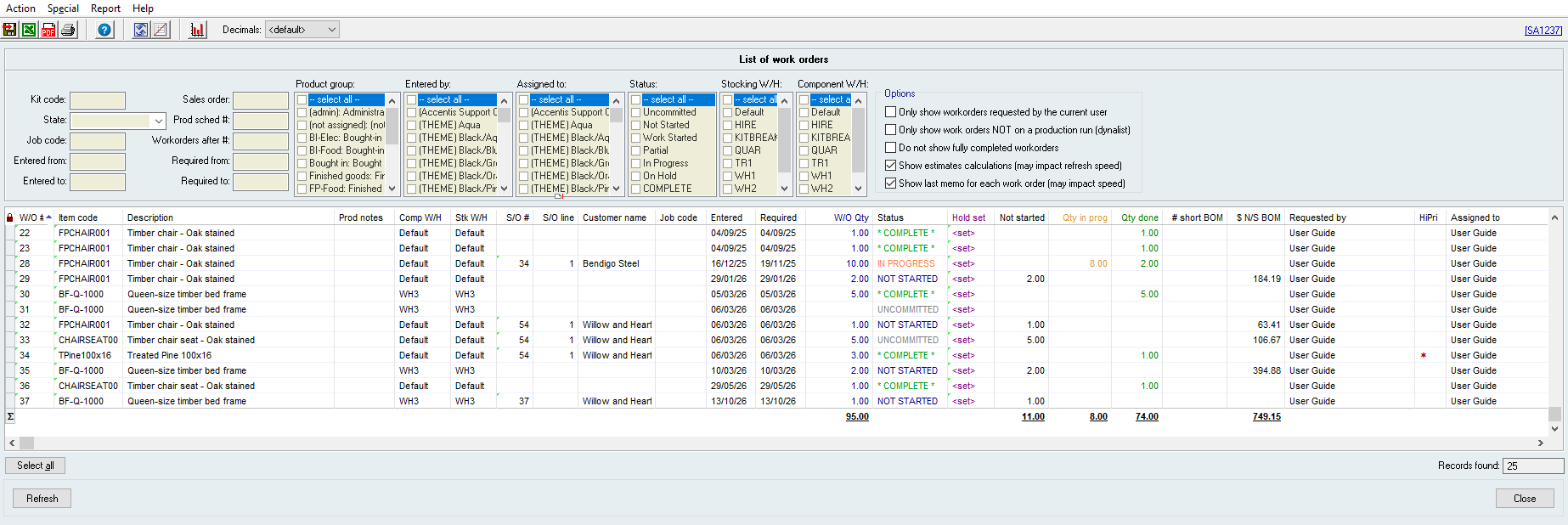

Key filters
 State
Limits results to work orders that are not fully committed, not fully started or not fully complete, depending on your selection.
Entered from
Limits results to work orders whose Date is on or after the date you enter.
Entered to
Limits results to work orders whose Date is on or before the date you enter.
Sales order
Limits results to work orders whose Sales order ref matches the text you enter.
Prod sched #
Limits results to work orders whose Production schedule matches the number you enter.
Workorders after #
Limits results to work orders whose Work order # is equal to or higher than the number you enter.
Required from
Limits results to work orders whose Date required is on or after the date you enter.
Required to
Limits results to work orders whose Date required is on or before the date you enter.
Product group
Limits results to work orders whose kit item is in one of the Product groups you select.
Entered by
Limits results to work orders whose Requested by matches one of the users you select.
Assigned to
Limits results to work orders whose Assigned to matches one of the users you select.
Status
Limits results to work orders with the statuses you select:
- Uncommitted
- Work orders whose Quantity Committed is 0.
- Not Started
- Work orders whose Quantity Started is 0 and have no corresponding timesheet entries (unless its status is uncommitted, on hold, or complete).
- Work Started
- Work orders whose Quantity Started is 0 and have corresponding timesheet entries (unless its status is uncommitted, on hold, or complete).
- Partial
- Work orders whose Quantity Finished is equal to its Quantity Started (unless its status is not started, uncommitted, on hold, or complete).
- In Progress
- Work orders whose Quantity Started is not equal to its Quantity Finished (unless its status is not started, uncommitted, on hold, or complete).
- On Hold
- Work orders that are marked as On hold (unless its status is uncommitted).
- COMPLETE
- Work order that are marked as Complete.
Stocking W/H
Limits results to work orders whose Stocking warehouse matches one of the warehouses you select.
Component W/H
Limits results to work orders whose Component warehouse matches one of the warehouses you select.
Only show workorders requested by the current user
Limits results to work orders whose Requested by matches the currently logged in user.
Only show work orders NOT on a production run (dynalist)
Limits results to work orders whose have no Production schedule set.
Do not show fully completed workorders
Limits results to work orders that are not marked as Complete.
Show estimates calculations (may impact refresh speed)
Adds columns to display the estimated labour and work centre hours for each result.
The additional columns may cause the report to refresh more slowly.
Show last memo for each work order (may impact speed)
Adds a column to display the latest memo for each result.
The additional column may cause the report to refresh more slowly.
Report columns
W/O #
The work order number. Results are sorted by this by default.
Description
The Description of the kit being built.
Prod notes
The Production notes of the work order (up to 255 characters).
Comp W/H
The Component warehouse of the work order.
Stk W/H
The Stocking warehouse of the work order.
S/O #
The Sales order ref of the work order.
S/O line
The number of the sales order line linked to the work order.
Customer name
The Customer name of the sales order linked to the work order.
Required
The Date required of the work order.
W/O Qty
The Quantity Requested of the work order.
Status
The progress of the work order.
- Uncommitted
- Work orders whose Quantity Committed is 0.
- Not Started
- Work orders whose Quantity Started is 0 and have no corresponding timesheet entries (unless its status is uncommitted, on hold, or complete).
- Work Started
- Work orders whose Quantity Started is 0 and have corresponding timesheet entries (unless its status is uncommitted, on hold, or complete).
- Partial
- Work orders whose Quantity Finished is equal to its Quantity Started (unless its status is not started, uncommitted, on hold, or complete).
- In Progress
- Work orders whose Quantity Started is not equal to its Quantity Finished (unless its status is not started, uncommitted, on hold, or complete).
- On Hold
- Work orders that are marked as On hold (unless its status is uncommitted).
- COMPLETE
- Work order that are marked as Complete.
Not started
The Quantity still to start of the work order.
Qty in prog
The Quantity in progress of the work order.
Qty done
The Quantity Finished of the work order.
# short BOM
The number of component items that have insufficient stock in the component warehouse to build the rest of the work order.
This is not the quantity of items you are short, only a count of the item codes.
$ N/S BOM
The total value of BOM components of the work order not yet started.
This is calculated at the component's average cost (or last cost when nothing is in stock).
Requested by
The Requested by of the work order.
HiPri
Indicates whether a work order has been marked as High priority.
Assigned to
The Assigned to of the work order.
Prod run #
The Production schedule for the work order.
P/R name
The Dynalist name of the work orders Production schedule.
Last memo
The first 255 characters of the most recent memo of the work order.
This column is only displayed when Show last memo for each work order (may impact speed) is ticked.
Est lab hrs
The estimated labour hours for the work order.
The sum total of the Est. labour duration for every route of every item (accounting for routes with a Max W/O Qty)
This column is only displayed when Show estimates calculations (may impact refresh speed) is ticked.
Est W/C hrs
The estimated work centre hours for the work order.
The sum total of the Est. work centre duration for every route of every item (accounting for routes with a Max W/O Qty)
This column is only displayed when Show estimates calculations (may impact refresh speed) is ticked.
Last edit: 29/10/2026