What does the "Direct account code entry not recommended" warning mean?
Overview
Occasionally, when using direct account code entry on your Accounts Payable forms (such as Supplier invoices or Purchase orders), you may receive the following warning:
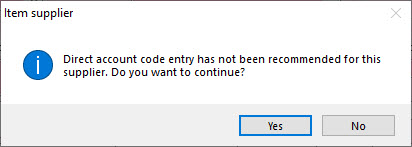
This warning does not prevent the user from continuing, nor does it require special permissions to bypass it. However, it can become annoying if you are receiving the warning frequently.
Why does the warning appear?
The way that Accentis facilitates direct account entry is via an Inventory item called “GLAccount”. If some Suppliers (such as a grocery store) are permitted to have direct account entry utilised, they can be allocated as Suppliers of this GLAccount Item.
This means that any Supplier that is not listed against the GLAccount Item will trigger this warning if a user attempts to use direct account entry for that Supplier. This is because there is essentially a direct account entry “whitelist”, and every other Supplier should be double-checked before using direct account entry – which is a beneficial feature!
How to suppress the warning
There are three ways to suppress the warning, depending on the outcome you want to achieve.
 Assign the Supplier to the GLAccount Item
If you only have one Supplier that triggers this warning, you can allocate them as a Supplier list of the GLAccount Item. This will mean that any direct account entry for that Supplier will not trigger the warning, but no other Suppliers will be affected.
If you want to keep the warning, just not for a specific Supplier, then this is the best option.
Remove all Suppliers from the GLAccount Item
If you want to use direct account entry for any supplier, remove all listed Supplier list from the GLAccount Item. This will tell Accentis that direct account entry is permitted for all Suppliers.
Suppress the warning in System Preferences
If you want the warnings to be suppressed altogether, regardless of which Suppliers are assigned to the GLAccount Item, tick the Accounts Payable System Preference called Suppress warnings regarding items not being supplied by the selected supplier.
Note: Enabling this preference will also suppress the warning that appears when a user adds an Item to a Purchase Order that is not supplied by that P/O’s allocated Supplier. If you want to keep this warning, do not tick this System Preference, and instead remove all Suppliers from the GLAccount Item.
Additional notes
If you want to know more about direct account entry and permissions restricting its use, please see Why can't I search the Chart of Accounts?
Did you find this article helpful?
If this article is missing information, ambiguous, or didn’t give you clear instructions, let us know and we will make it better! Please email us and quote the KB# in the top right of this article to let us know why it didn’t help you out and we will point you in the direction of additional information.
Last edit: 02/02/24